

How Copy Fail Impacts VMware Cloud Foundation
Copy Fail (CVE-2026-31431) is a recently disclosed Linux vulnerability that affects nearly all Linux distributions released since 2017. To summarize, this vulnerability allows an unprivileged local user to reliably obtain root privileges on a Linux machine. It does so by exploiting a logic bug in the kernel module:

The sheer number of potentially affected machines is prompting organizations worldwide to scramble to assess their attack surface. Teams running VMware Cloud Foundation (VCF) may be particularly concerned because all of VCF’s management appliances, such as vCenter Server and NSX Manager, run on Linux. However, it’s important to take a step back and really assess the impact of a new vulnerability, despite the pandemonium.
Is VCF Affected By Copy Fail?
Copy Fail poses a low risk to your VCF management appliances. Many VCF appliances are not running the module at all, meaning they are not vulnerable at all. Copy Fail can also only be exploited from a local shell with an unprivileged user account, which significantly reduces the risk to all remaining VCF management appliances.
That is not to say your entire environment running in VCF is safe from Copy Fail. The scope of this blog is focused specifically on VCF management appliances, but it does not assess the risk to Linux user workloads running within VCF. If you have users running Linux workloads in your VCF environment, we recommend conducting your own assessment to determine the overall risk to those systems.
Many VCF Appliances Are Already Non-Vulnerable
Our initial tests show that several VCF management appliances already have the vulnerable module disabled. We confirmed this using the following command, which checks if the kernel module is loaded in the system.

We tested the following appliances and found that most are already non-vulnerable to Copy Fail. The key indicator appears to be when an appliance is running Photon OS 5.
We also see that our vSphere Kubernetes Service (VKS) nodes running Photon OS 5 are non-vulnerable. This is great news because Copy Fail normally poses a high risk to Kubernetes clusters. Teams running VKS can hopefully breathe a little easier.
For completion’s sake, we also tested ESX. But it runs a purpose-built kernel that isn’t Linux, so it was already guaranteed not to be vulnerable.
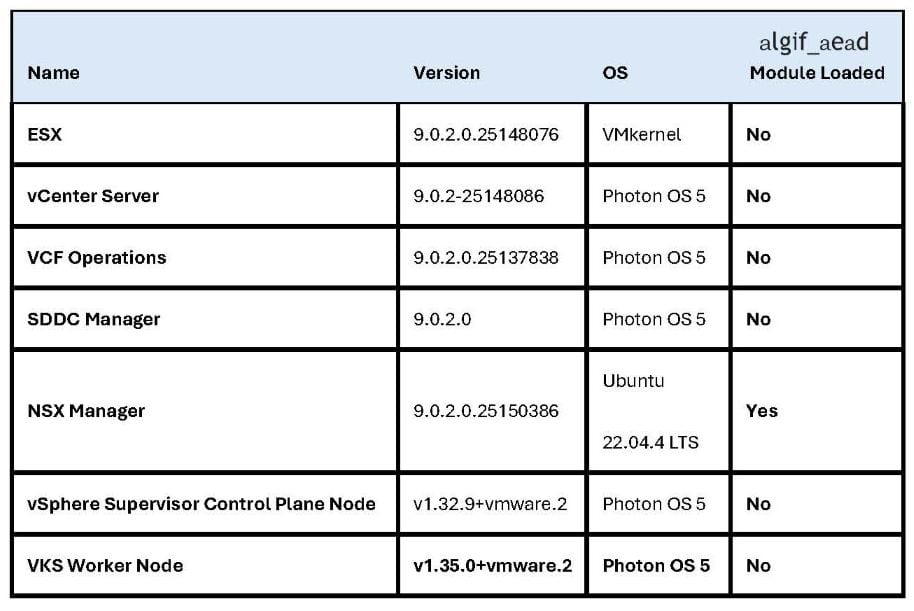
These are good results, but we strongly urge you to also perform the checks in your own environment for full confirmation. We’re unfortunately not able to test all possible versions and configurations of every available VCF management appliance. While it may be good news, you should validate it for yourself.
Unfortunately, not all VCF appliances are non-vulnerable. You can see that NSX Manager is the odd one out, running both Ubuntu 22.04.4 and the vulnerable module. The immediate mitigation recommended by Xint is to disable the module. While this certainly does fix the security issue, Broadcom has made its stance on this very clear in KB 367354.
To summarize, changing the underlying operating system of any VCF appliance is unsupported and puts that appliance in an unsupported state. If you run into any issues with that appliance later on and require technical support, VMware support reserves the right to require you to revert the modification before providing assistance. Even if the modification was unrelated to the issue at hand.
The VMware Security Response Center is still assessing the vulnerability and officially determining the impact and any required workarounds. Your best course of action is to subscribe to the VMware Security Advisories and follow the recommendations there.
Even so, just because NSX Manager is running the vulnerable module doesn’t mean it’s at high risk of compromise. Because Copy Fail requires a local shell with an unprivileged user account, the overall risk to these remaining appliances is still very low.
VCF Appliances Have Almost No Local Unprivileged Users
To use Copy Fail, an attacker must be logged into the appliance itself. Either through SSH or the vSphere web console. This means an attacker cannot remotely compromise Linux machines en masse. They first require access to the machines themselves, usually through local user credentials.
An account on the appliance’s web service is not sufficient. For example, a user account in the vSphere UI does not allow you to log in to the vCenter Server shell. It must be a user account for the appliance’s Linux operating system.
However, the only local accounts available on VCF management appliances are the admin accounts used by VCF administrators for troubleshooting. These accounts are almost always either an account with full sudo privileges or root itself. Using Copy Fail in these scenarios provides no new gains because you’re already logged in with root privileges. There’s nothing to escalate to.
What Should I Do?
Copy Fail poses a low risk to your VCF management appliances, but it isn’t “no risk”. For example, if a vulnerability in NSX Manager is released that only provides user-level privileges on the NSX Manager appliance, an attacker could leverage Copy Fail as the final step to reach root.
Your best bet is to simply continue following your normal VCF security best practices. Including:
- Keep all of your appliances up to date to protect them from new security
- Ensure access to local admin accounts is locked down and only used for short-term, troubleshooting purposes.
- Implement a secure identity provider using multi-factor authentication for administrative
- Configure network access controls to ensure only approved administrators can access management appliances.
If you need help securing VCF, connect with ClearBridge today!
Recent Comments